Quick Excel Reader(OSS Java Lib)

Have been thinking for quite some time to write this utility. I wrote similar utilities like this to parse excel file quickly on every projects I worked on last few years.
I don't know how useful it will be on this AI era, may be just for myself :-)

Overall Arch
Intentionally we published this package as standalone library, so that can be used with any Java/J2EE framework. This library published to maven central so you can easily integrate with any build tools i.e. Maven or Gradle of your choice.
-
Input
- Json defination file
- Excel Data file
-
Output
- Get Map of key , value pair in the same structure provided in defination file. So that you use BeanUtils like package to copy data from Map to custom DTOs.
Getting Started
To get started, you’ll need a working Java project. If you want to work with SpringBoot project checkout Spring Initializr. There is sample SpringBoot application in sample folder of the github project, please refer README file.
- Add the following to your
pom.xmlfile to use the
Quick Excel Reader library in your Java project. Checkout for latest version in Maven Central or mvnrepository.com
<dependency>
    <groupId>com.github.nemo97</groupId>
    <artifactId>quick-excel-reader</artifactId>
    <version>1.0-RC</version>
</dependency>
- You need to add the following dependencies to your
pom.xmlfile for JSON and Excel parsing, if already not present.
<dependency>
    <groupId>com.fasterxml.jackson.core</groupId>
    <artifactId>jackson-databind</artifactId>
    <version>2.15.2</version>
</dependency>
<dependency>
    <groupId>org.apache.poi</groupId>
    <artifactId>poi-ooxml</artifactId>
    <version>5.2.3</version>
</dependency>
- Create Excel defination file in resources for maven project to read following excel file. Refer schema defination section for details.
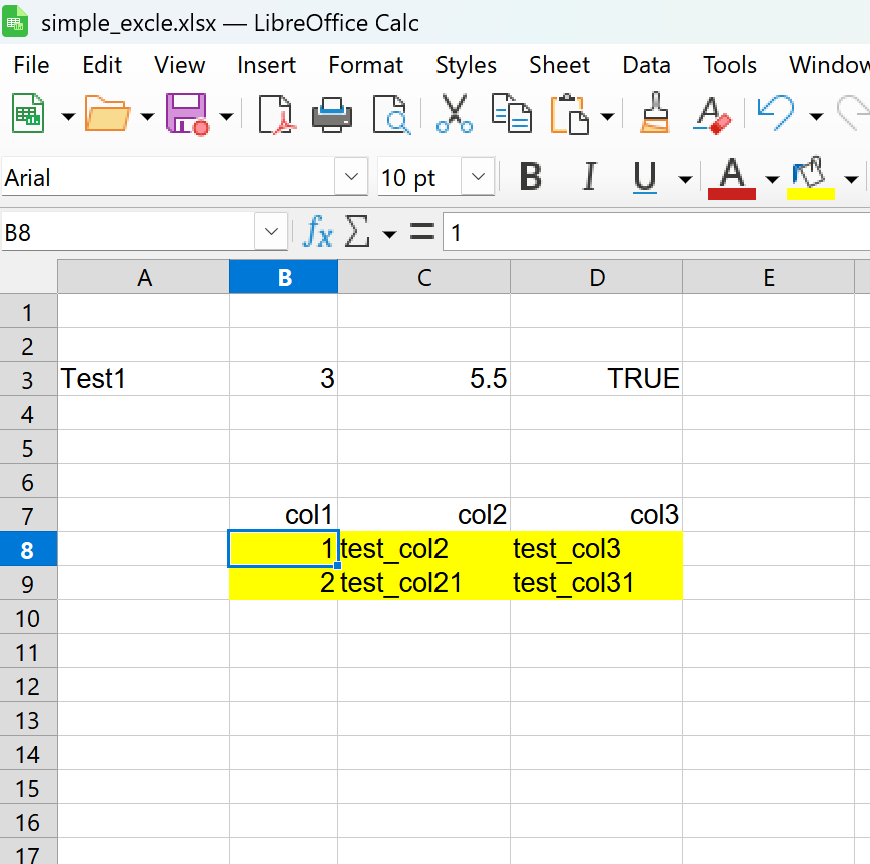
{
  "schemaVersion": "1.0",
  "sheets": [
    {
      "sheetName": "def1", /* excel sheet name, sheet can be any order. Code with match the name before read corresponding sheet   */
      "description": "This is a sample definition file for def1.",
      "fields": [
        {
          "name": "field1", /* Field name, this will key name result map. So make it unique */
          "xlsColumn": "A3", /* Excel column to map. Mandatory on first field. When not provided, it wil assume next cell of same row*/
          "type": "string", /* Type string */
          "validation": { /* for future use */
            "required": true,
            "maxLength": 50,
            "regex": "^[a-zA-Z0-9_]+$"
          },
          "description": "This is a string field."
        },
        {
          "name": "field2",
          "type": "long", /* type is long. when no xlsColumn filed provided, it will assume next cell of same row. For this defination this field will map to B3 */
          "validation": {
            "required": true,
            "range": {
              "min": 1,
              "max": 100
            }
          },
          "description": "This is an integer field."
        },
        {
          "name": "field21",
          "type": "double", /* double type to read as floating point number, map to C3 */
          "validation": {
            "required": true,
            "range": {
              "min": 1,
              "max": 100
            }
          },
          "description": "This is an decimal field."
        },
        {
          "name": "field3",
          "type": "boolean", /* boolean type */
          "validation": {
            "required": true
          },
          "description": "This is a boolean field."
        },
        {
          "name": "field4",
          "type": "table", /* this is special type to read table of data */
          "xlsColumn": "B8-B9", /* xlsColumn range for table, if this is missing has to provide in fields level(both inclusive).For complex type of table when columns have been merged , you have to provide in fields lebel.*/
          "fields": [
            {
              "name": "field4a",
              "type": "long",
              "validation": {
                "required": true
              },
              "description": "This is a long field."
            },
            {
              "name": "field4b",
              "type": "string",
              "validation": {
                "required": true,
                "maxLength": 100
              },
              "description": "This is a string field."
            },
            {
              "name": "field4c",
              "type": "string",
              "validation": {
                "required": true,
                "maxLength": 100
              },
              "description": "This is a string field."
            }
          ]
        }
      ]
    }
  ]
}
You can use the src\test\QuickExcelReaderTest test class as a reference.
// Copy Excel and JSON files from classpath to temp files
InputStream excelStream = getClass().getResourceAsStream("/simple_excel.xlsx");

Path excelFile = Files.createTempFile("test", ".xlsx");
        Files.copy(excelStream, excelFile, java.nio.file.StandardCopyOption.REPLACE_EXISTING);

InputStream jsonStream = getClass().getResourceAsStream("/def1.json");
Path jsonFile = Files.createTempFile("test", ".json");
        Files.copy(jsonStream, jsonFile, java.nio.file.StandardCopyOption.REPLACE_EXISTING);


QuickExcelReader reader = QuickExcelReader.builder()
        .excelPath(excelFile)
        .jsonPath(jsonFile)
        .build();

ResultExcelData result = reader.read();

// print the result as map
System.out.println("Result: " + result.getDataMap());
Excel Definition Schema
Here is a concise Markdown documentation for the JSON schema in src/main/resources/config_schema.json:
Overview
This schema defines the structure for configuring Excel sheet definitions, including sheets, fields, and validation rules.
Root Object
| Property | Type | Description | Required |
|---|---|---|---|
| schemaVersion | string | Version of the schema | Yes |
| sheets | array | List of sheet definitions | Yes |
Sheet Object
| Property | Type | Description | Required |
|---|---|---|---|
| sheetName | string | Name of the sheet | Yes |
| sheetIndex | integer | Index of the sheet | No |
| description | string | Description of the sheet | No |
| fields | array | List of field definitions | Yes |
Field Object
| Property | Type | Description | Required |
|---|---|---|---|
| name | string | Field name | Yes |
| xlsColumn | string | Excel column name | No |
| type | string | Data type: string, double, long, boolean, table | Yes |
| validation | object | Validation rules (see below) | No |
| description | string | Field description | No |
| fields | array | Nested fields (for type table) | No |
Validation Object
| Property | Type | Description | Required |
|---|---|---|---|
| required | boolean | Whether the field is required | No |
| maxLength | integer | Maximum length (for strings) | No |
| regex | string | Regular expression pattern | No |
| range | object | Numeric range (see below) | No |
Range Object
| Property | Type | Description | Required |
|---|---|---|---|
| min | number | Minimum value | Yes |
| max | number | Maximum value | Yes |
Example
{
  "schemaVersion": "1.0",
  "sheets": [
    {
      "sheetName": "Users",
      "fields": [
        {
          "name": "username",
          "type": "string",
          "validation": {
            "required": true,
            "maxLength": 20
          }
        }
      ]
    }
  ]
}
Notes
- Fields of type
tablecan contain nestedfields. - All required properties must be present in the configuration.